Integration Details

Restaurant POS Software
Checks, tables, kitchen and payment in one app

RoxPos restaurant POS unites checks, table layout, kitchen printing, payment and reporting in one cloud. iPad, Android, web — no install.

Restaurant POS Software

Key Highlights

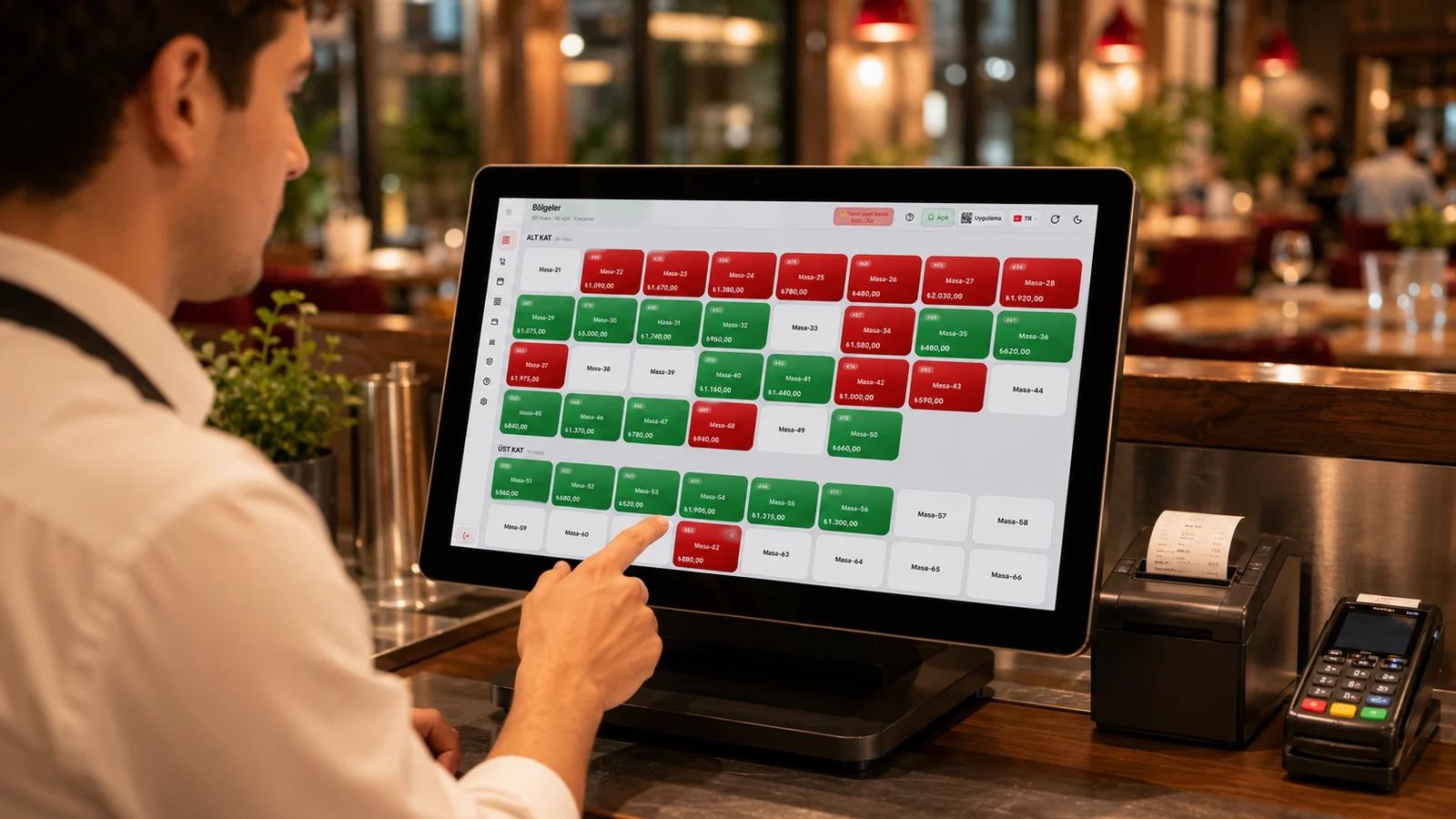
Checks and table layout — link orders to tables, track and split.

Every order is tied to the table it belongs to, so you always see what each table has consumed in real time throughout service. You can split a check by guest or by item, dividing it in a single tap when customers want to pay separately. This keeps orders from getting mixed up and prevents missed charges during busy service.

Kitchen printer routing — orders print to the right station.

Incoming orders are routed automatically to the right printer such as the kitchen, bar, or dessert station based on the product group. Waitstaff no longer need to carry tickets to each station by hand, since every section instantly sees only the items it has to prepare. This shortens preparation time and reduces the chance of dishes being made incorrectly or left out.

Multiple payment: cash, card, fiscal device and split bills.

You can close a check with cash, card, or store credit, and combine these methods on the same bill. Because it integrates with Beko, Ingenico, PAX, and Hugin fiscal POS devices, the amount is sent to the terminal automatically with no need to re-enter it by hand. Split payment lets everyone at the table pay their own share separately with the method they prefer.

Cloud + no install: works on iPad, Android, phone and web.

RoxPos is fully cloud-based, requires no installation, and does not depend on a dedicated Windows register. It runs on iPad, iPhone, Android tablets and phones, or any web browser, so you can start right away with the devices you already have. Since all data is kept in the cloud, you see and manage the same information across different devices at the same time.

What Does This Integration Deliver?

Uniting order, kitchen, payment and reports in one app

An order taken by a waiter drops to the correct kitchen station at the same moment, stock is reduced automatically when the bill is closed, and every movement flows into live reports. Instead of moving data between separate programs, ordering, preparation, payment, and reporting work connected on a single cloud platform. This integration removes double-entry and mismatch errors and gives you a consistent picture at the end of the day.

Starting to sell on existing tablets/phones with no new hardware

Because RoxPos needs no installation and runs from the cloud, you can open it in a browser on your existing iPad, Android tablet, or phone and start selling right away. You are not forced to buy an expensive POS register or dedicated Windows hardware, which lowers your startup cost. As the business grows, adding a new device is as simple as signing in to the same account.

Managing tables and orders without errors during a busy service

Through the visual floor plan you see at a glance which tables are occupied, open, or reserved, and you enter orders directly onto the right table. During rush hour you can split checks, merge tables, and because orders route automatically to the correct kitchen station, nothing gets mixed up. This speeds up service and minimizes the risk of orders going to the wrong table or being forgotten.

Tracking the business live from a phone, remotely

Thanks to the cloud infrastructure, you can view turnover, open tables, and sales activity live from your phone at any time. If you run more than one branch you can compare them, export reports to PDF or Excel, and follow how things are going around the clock without being on site. This remote access keeps you in control even when you cannot be at the venue.

Related Solutions

Frequently Asked Questions

Which devices does RoxPos POS run on?

iPad, iPhone, Android tablet/phone, Windows, macOS and web browser. As it is cloud-based, no installation is needed; you sign in from your device and start.

Can I print to kitchen and cashier printers?

Yes. Items are routed to the right printer by category; kitchen orders print in the kitchen and receipts at the cashier. Multiple printers and stations are supported.

Is it integrated with fiscal devices?

Yes. RoxPos integrates with Beko, Ingenico and PAX fiscal devices; the sale amount is sent to the device automatically, with no need to re-enter it.

What happens if the internet drops?

RoxPos is cloud-based; a stable internet connection is recommended for uninterrupted use. Operations sync when the connection returns.